A focused iPhone and iPad command surface for the road, the trail, and the evidence
left behind. MobileCommandISR brings live vehicle telemetry, useful iPhone context,
and trip history together—then presents the information that matters at a glance.
Build 37 previewiPhone + iPadCarPlay within Apple limits
DriveFuel, range, efficiency, temperatures, powertrain, and electrical status
TrailAttitude, wheel speeds, altitude, horsepower history, and trail vitals
TripsDrive and off-road history, fill-ups, route points, details, and export
HealthRead-only emissions readiness and diagnostic trouble-code awareness
Two data streams · one resolved picture
Vehicle first. The iPhone adds the context the car cannot.
MobileCommandISR does not replace vehicle data with phone estimates. It uses each
source where it is strongest, preserves provenance, and falls back conservatively
when a signal is unavailable or not yet trusted.
01 · Vehicle / OBD-II + CAN
Primary operating data
Fuel quantity and fuel flow
Speed, RPM, odometer, and temperatures
Hybrid and 12-volt electrical values
Four-wheel speed and standard emissions health
02 · iPhone sensors
Source, augmentation, and fallback
Core Location altitude, position, course, and route points
Calibrated phone motion for pitch and roll fallback
Cross-checking and context when vehicle attitude is provisional
Clear source labels instead of pretending every value came from the ECU
03 · Resolved telemetry
One honest display layer
Validated vehicle data takes priority
Trusted phone profiles can supply a safe fallback
Raw, derived, demo, and unavailable states remain distinct
Calibration history and confidence stay attached to the result
Designed as a three-surface system
iPhoneCompact live drive, Overland, trips, telemetry, and setup.
iPadThe full, information-dense Trail and trip command surface.
CarPlayA simplified glanceable screen within Apple's allowed templates.
Build 37 preview
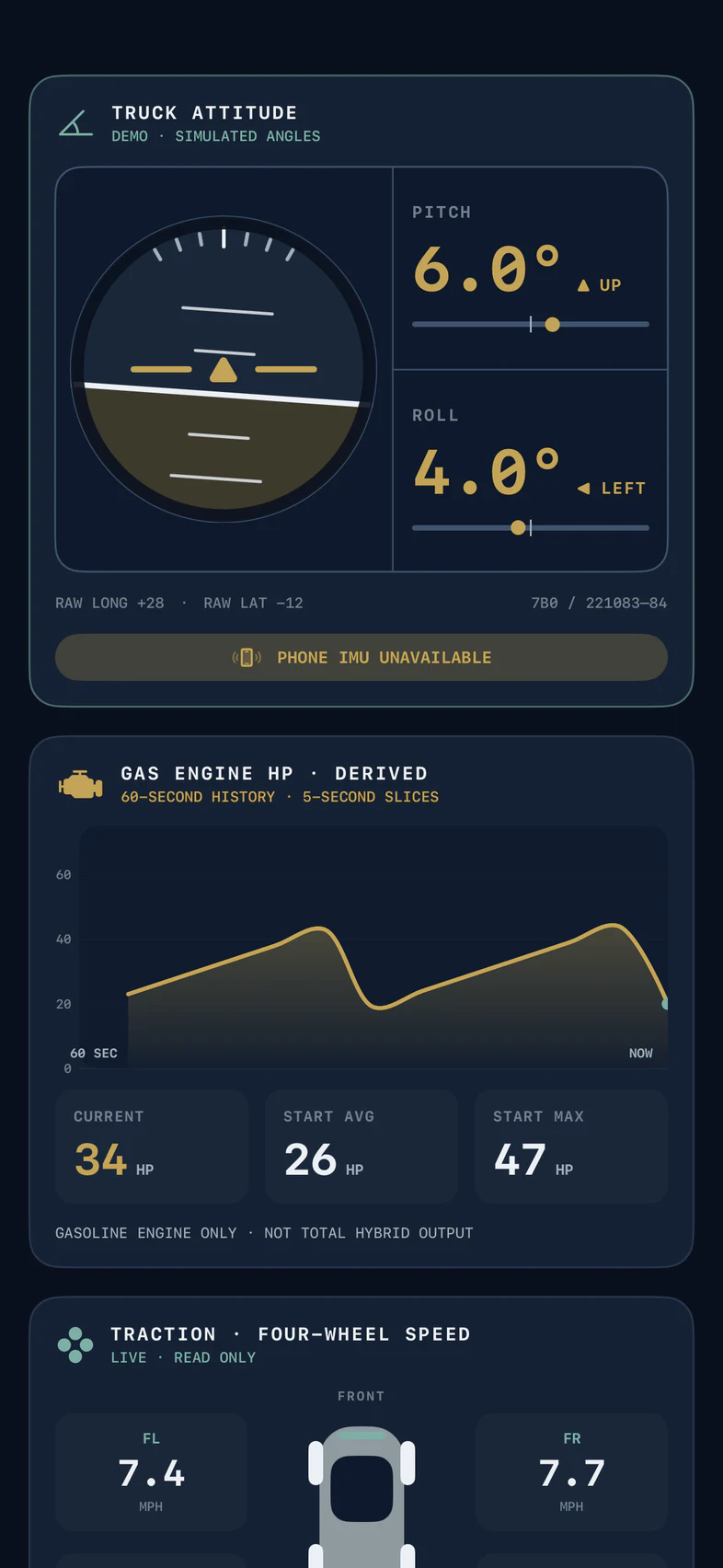
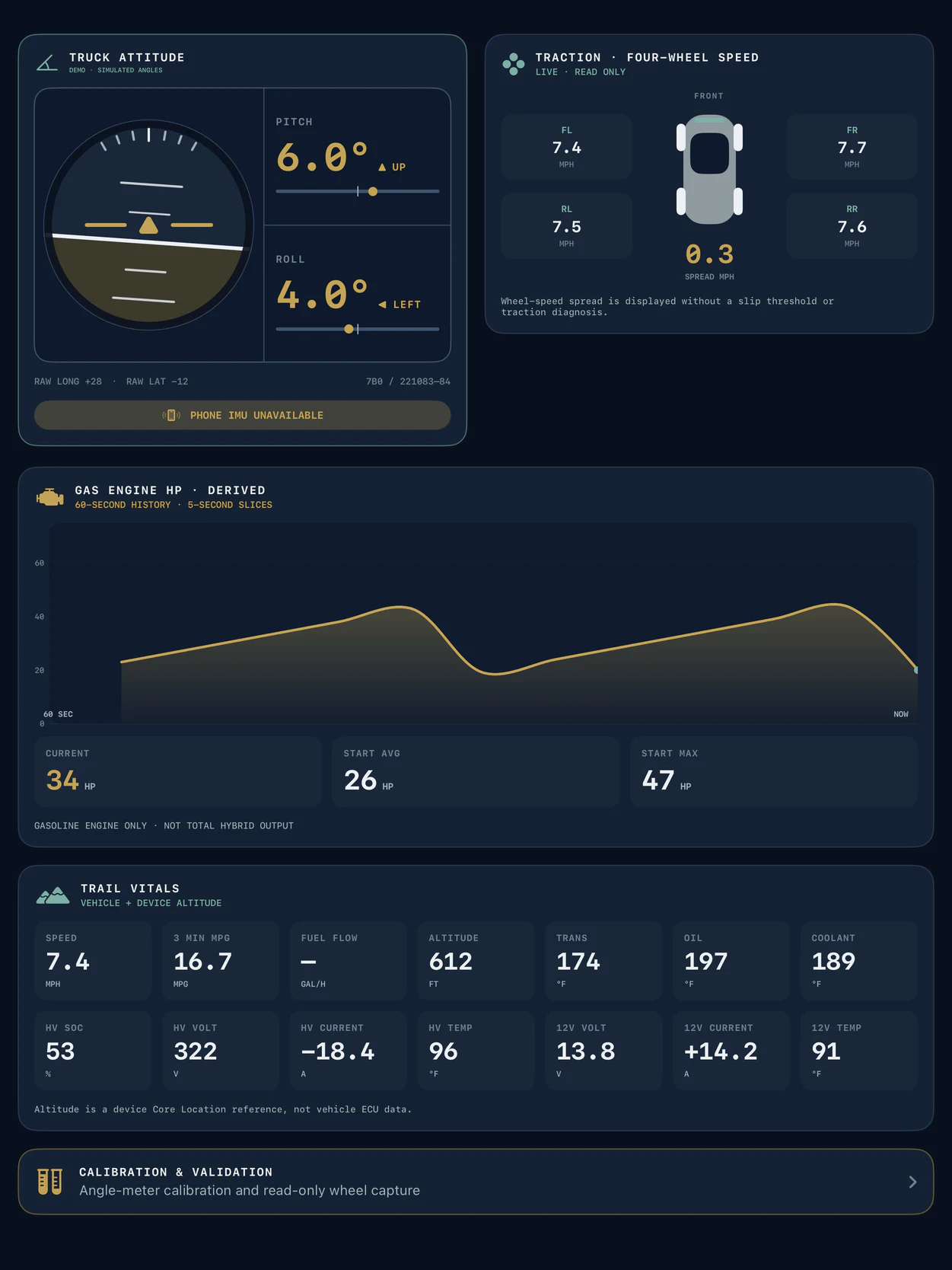
Choose the attitude view that works for you.
Choose persistent Twin Vehicle Dials or an aircraft-style Attitude Ball across the
iPhone and iPad Overland views. Both use the same resolved telemetry and calibration
path, so the presentation can change without changing the underlying truth.
B37
The current development build brings attitude, four-wheel speed, gasoline-engine
horsepower history, altitude, and trail vitals together in one adaptable iPhone and
iPad surface.
Build 37 · iPhone Overland production view · simulated telemetry
Build 37 · iPad Overland production view · simulated telemetry
Screenshots demonstrate current software presentation and responsive layout. Demo or
simulated values are not presented as proof of an exact-vehicle signal.
The app experience
What you need during the drive—and the evidence after it.
The current development build already connects, records, calculates, and presents a
substantial vehicle picture. Broader vehicle support will follow only after each
signal and adapter path is proven.
Current development build
Live Drive
Fuel remaining, fuel flow, and distance to empty
A true rolling three-minute MPG view
Speed, RPM, odometer, and key temperatures
Gasoline/EV share, hybrid status, and 12-volt health
Current development build
Overland + Trail
Selectable Twin Vehicle Dials or Attitude Ball
Individual speed from all four wheels for comparison—not traction diagnosis
Gasoline-engine horsepower history and altitude
Glanceable trail vitals with calibrated source handling
Current development build
Trips + Fuel
Separate Drive and Off-Road trip records
Fill-ups, history, details, and deletion controls
GPS route points and CSV export
Manual trip control today, with zero-touch lifecycle planned
Current development build · read only
Quiet Health
Standard emissions readiness and diagnostic monitoring
Confirmed, pending, and permanent trouble-code records
Useful awareness without programming modules or clearing codes
Health evidence retained alongside the drive context
Current build + planned expansion
Fuel Ahead + Widgets
Nearby fuel searches weighted toward the current direction of travel
Driver preferences for more relevant results
Glanceable widgets for useful vehicle information
Route awareness and optional live prices remain future considerations
Apple-limited development direction
CarPlay
Simplified Trip and Trail summaries using legitimate Driving Task templates
Only permitted instrument counts, layouts, and refresh behavior
A focused glance surface—not a free-form copy of the iPad screen
Final presentation remains subject to Apple's platform limits and review
Adapter compatibility
Built around a reliable Bluetooth OBD-II connection.
The adapter transports requests and replies. MobileCommandISR supplies the
Toyota-specific requests, decoding, validation, and calculations. A marketing claim
of “enhanced data” is not the same thing as working with this app.
Tested + recommended
Vgate vLinker MC+
The only adapter physically validated end to end with MobileCommandISR and the
exact sixth-generation 4Runner. It has handled the app's normal targeted
standard and Toyota-enhanced polling reliably. For someone buying specifically
for MobileCommandISR, this is the current reference choice.
iPhone discovery name
vLinker MC-IOS
Current transport
Bluetooth Low Energy
Purchase guidance
Genuine iOS/BLE model
Scheduled for validation next
These models are already represented in the next closed field-validation group.
Until that work is complete, they are not recommendations or confirmed support.
Next validation · 2 vehicles
Carista EVO
Scheduled across two vehicles. Direct MobileCommandISR connectivity and sustained data behavior remain unvalidated.
Next validation
OBDLink CX
A strong BLE candidate for iPhone testing, but not yet physically validated with this app and vehicle family.
Next validation
Veepeak OBDCheck BLE
Queued to broaden real-world BLE coverage beyond the current vLinker reference path.
Controlled reference
Another vLinker MC+
A second MC+ reference will provide a controlled comparison on another vehicle.
Not currently compatible
OBDLink MX+
Its Bluetooth Classic path does not match the app's current CoreBluetooth BLE transport. A BLE alternative is required unless the architecture changes.
Future validation queue
Additional models on the compatibility watch list will follow after the next
scheduled group. They are future checks—not support or purchase recommendations.
Future BLE candidate
Veepeak OBDCheck BLE+ / BLE+ Plus
Research-backed iOS BLE candidate awaiting direct MobileCommandISR and Toyota-platform testing.
Future BLE candidate
Vgate vLinker FD+
Queued for later transport and targeted-polling comparison with the validated MC+ path.
Future BLE candidate
Vgate iCar Pro BLE 4.0
A lower-priority Vgate alternative awaiting direct app, vehicle, and sustained-drive validation.
Exploratory only
BlueDriver Pro
Included in the original intake list, but no project evidence currently establishes an open data path usable by MobileCommandISR.
Exploratory only
FIXD Sensor
Included in the original intake list, but no project evidence currently establishes custom third-party interoperability.
Compatibility status is specific to MobileCommandISR's current iOS Bluetooth Low
Energy architecture. This is a validation priority list—not a universal quality
ranking of OBD-II products.
Coming next
The app will grow by proving each layer first.
Planned features focus on making the existing experience more automatic, more
personal, and easier to carry across Apple devices. Exploratory ideas remain clearly
separate until the underlying signals and services can be trusted.
On the product roadmap
Broader vehicle and adapter validation using the same evidence workflow
Zero-touch trip start and stop
Private sync across a driver's Apple devices
Richer trip maps, elevation review, and pause/resume
VIN-scoped calibration and stronger per-vehicle profiles
Being explored
An app-owned route for true route-aware Fuel Ahead results
Optional live fuel prices if a practical provider and cost model exist
Pause/resume, richer trip maps, elevation, and longer-term efficiency views
Apple Watch and Live Activity glance surfaces
Traction interpretation and combined hybrid output only if the underlying signals can be proven
Vehicle scope
Starting with the sixth-generation 4Runner. Built to expand carefully.
Current product support remains limited to the sixth-generation Toyota 4Runner.
Other GA-F vehicles below are future validation targets, not announced support.
Current support
Sixth-generation Toyota 4Runner
The exact vehicle path used to validate the vLinker MC+, live drive data, trip
evidence, fuel signals, and the current development build.
Future vehicle validation
GA-F platform expansion targets
2022+ Tundra2023+ Sequoia2024+ Tacoma2024+ Land Cruiser2025+ 4Runner
Validation is planned across Tundra, Sequoia, Tacoma, Land Cruiser, and additional
sixth-generation 4Runner configurations before broader support is announced.
Coming soon
A clearer relationship with the vehicle you already drive.
MobileCommandISR is being built to make complicated vehicle data useful at a glance—
during the drive, off pavement, and long after the trip ends.
Upcoming product preview as of July 30, 2026. Build 37 screenshots use simulated
telemetry. Feature, adapter, vehicle, CarPlay, pricing, and public-release plans may
change as physical testing and Apple review constraints are resolved. MobileCommandISR
uses read-only OBD-II/UDS requests; it does not program vehicle modules or clear codes.
Toyota, Apple, CarPlay, and adapter product names are trademarks of their respective
owners. No adapter manufacturer sponsors this recommendation.